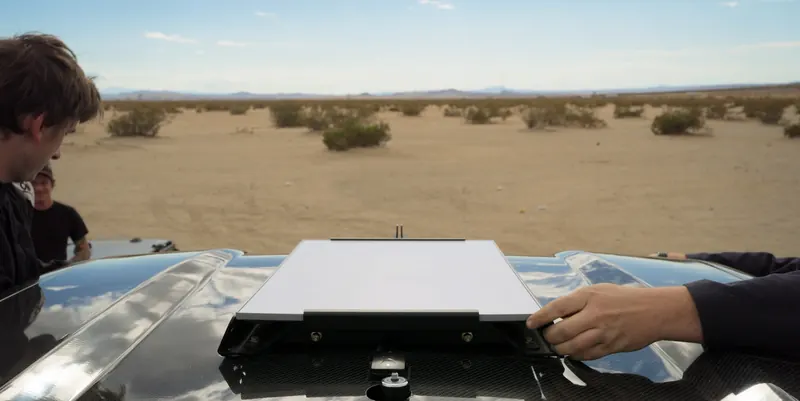
Work from anywhere with Starlink: car, forest, park or campsite
This is my referral link, so I may earn a reward if you order. Checkout is on Starlink.com, and Starlink sets the credit, now $100 for new U.S. customers.
Plenty of remote jobs can run from a parked car, a forest-road pullout, a campground or a trailhead, and a Starlink dish can bring the connection where cell signal is thin. It is not coverage everywhere. The dish needs open sky, the laptop and dish need power, and the plan has rules you should read before you count on it for work.
This guide covers what Starlink says about working on the go, the business-use line in its Fair Use Policy, how to find sky from a car, power for a full day, calls and backups, and the public-land rules for stay limits and generator hours. We read the Starlink pages and the Forest Service, BLM and National Park Service pages on November 27, 2026. We have not road-tested every setup, and a posted sign beats this page.
What Starlink says about working on the go
Starlink's own service-plans page lists Roam as "Best for RVs, nomads, and campers, and working on the go." Its Roam help article says Roam "is designed for connectivity on the go — whether you're working remotely, traveling internationally, or in motion with your car, boat, or RV." So remote work is an intended use, with conditions: open sky, power, and a plan that fits how much data your workday burns.
On November 27, 2026, Starlink listed three Roam plans for U.S. accounts. All three can be used in motion in authorized locations, and all three can be paused with Standby Mode between trips.
| Roam 100GB | Roam 300GB | Roam Unlimited | |
|---|---|---|---|
| Monthly price | $55 | $80 | $175 |
| High-speed data | Starlink says about 1 week of typical use | Starlink pitches it for regular travelers with multiple trips a month | Unlimited high-speed data |
| After the high-speed data | Unlimited low-speed data: email, calls and texts work; video calls, streaming and large downloads are limited | Same as Roam 100GB | Not applicable |
Speeds on all three are listed as "up to 300+ Mbps" and are not guaranteed. The full side-by-side is on the Roam plans comparison.
Check the business-use line before you rely on Roam for a job
Remote work is the whole point of this page, so this is the part to read twice. Starlink's Fair Use Policy describes Roam data as "designed for low demand, land-based use, such as travel, camping or nomadic living," and says "The Roam Unlimited Service Plan is not permitted for business or enterprise uses." The same policy says Priority plans are "designed for high demand users, such as those with business, government or institutional needs."
We can't tell you whether your own job counts as business use. Plenty of people check email and join video calls from a camp, and Starlink decides how its terms apply. If you run a business off the connection, host video meetings all day or need a guaranteed speed, ask Starlink before you order and look at its Priority plans. Roam data is also deprioritized in congested areas and at peak hours, so a Roam connection is a good fit for a flexible workday and a poor fit for a hard deadline with no backup.
Roam for the road
Planning a remote week away from the desk?
Start the Roam order on Starlink's site and test the kit at home first. The kit and plan cost exactly what Starlink charges anyway.
Click to get your $100 credit (opens Starlink's order page in a new tab)
Referral note: this is a referral link to Starlink's order page. New Roam or Residential customers who order through it can get a reward from Starlink after two months of service, $100 in the U.S. at the moment, as bill credit or cash. Starlink decides the amount and the rules.
Where people work from, and what changes
A parked car on a forest road, a numbered campground site and a trailhead lot all need the same three things: open sky, power and a connection you can fall back on. The rules around them differ a lot, though.
| Where | Sky | Power | Rules to check |
|---|---|---|---|
| Parked car or van at a forest-road pullout or dispersed site | Walk the spot first. A clearing or the open side of a road cut beats a site under tall trees. | Power station, house battery or an inverter on the vehicle battery. The dish and laptop share it. | Stay limits (Forest Service land is usually 14 days), how close you may camp to developed sites, fire restrictions. |
| Developed campground in a national forest, national park or state park | The edge of a loop, a picnic area or a clearing. Your assigned site may sit under trees. | A hookup if the site has one. Otherwise a power station, because generators run only in posted hours. | Posted generator hours and quiet hours, no mounting to trees or signs, anything the host says. |
| Trailhead or day-use stop | The edge of the lot, a viewpoint or a meadow nearby. | Mini 2's built-in battery (Starlink: 71 Wh, up to 4.5 hours) or a power station. | Day-use and parking rules. Ask before setting a dish on property you weren't told you could use. |
Finding sky when your office is a car
Starlink says the dish "works best with a clear view of the sky. A partial view is often enough," and that brief switches around trees and buildings are "generally imperceptible." Trouble starts when the blockage keeps interrupting you, and a video call is the first thing to show it. The original Mini lists a 110° field of view, so it sees a wide cone, not a pinhole.
A routine that works for most parked setups:
- Before you drive in, look at a satellite map for open ground: a lake shore, a meadow, a road cut or a ridge pullout. These are clearings, not guarantees.
- At the spot, run the obstruction check in the Starlink app where the dish will sit and at the height it will sit.
- Move before you cut. Starlink's own obstruction guide lists cutting a branch as a fix. On public land, that is not yours to do. Move the vehicle, move the dish, run a longer cable (Starlink sells extended cables) or use a pole you brought.
- Unplug and reboot the dish when you move it. Starlink's guide says to do this.
- Plan on the dish sitting outside the vehicle. Starlink's terms make you responsible for installing the kit with a clear field of view of the sky, and a roof of metal and glass is not that.
Power for a workday
Starlink's specification sheet gives the original Mini an average draw of 25 to 40 W. Over an eight-hour day, that is 200 to 320 Wh for the dish alone, before the laptop, a monitor or a phone charger. The Mini takes 12 to 48 V DC, so a vehicle battery, a house battery or a power station can feed it. The Mini power draw page turns those watts into amps.
Mini 2 has a swappable 71 Wh battery that Starlink rates at up to 4.5 hours, so it can cover a morning of calls but not a full day on its own. Mini 2 preorders are by invitation for select U.S. customers as of November 27, 2026, and the Mini 2 page has the specs.
If you plan to run the engine for power, check the rules first. At Big Bend National Park's campgrounds, for example, the posted rule says "Idling vehicle engines are considered generators in this regard," which means they are limited to the same hours.
Calls, upload speed and a backup plan
Video calls are the hardest thing a satellite connection does all day, and upload speed matters as much as download. Starlink says speeds on Roam are not guaranteed and are slower in congested areas and at peak hours. On Roam 100GB and 300GB, once the high-speed data is gone, Starlink says video calls are limited.
A few habits that cost nothing:
- Keep a phone hotspot as a second connection, even if the signal is weak. Starlink can drop when something blocks the dish, and a backup turns a lost meeting into a short glitch.
- Download files and open the documents you need before the call, not during it.
- Join important calls from your best-tested spot, and keep the camera off when the audio is what matters.
- Work out your data. An hour of Zoom group video at 720p is about 2 GB by Zoom's own figures, which the RV page's data table walks through.
Working while the vehicle is moving
Roam plans can be used in motion up to 100 mph in authorized locations with a supported kit mounted for travel, so a passenger can handle messages or a call on the road. Starlink says that is not allowed on any Residential plan, and not in Standby Mode. The driver drives. For a meeting that matters, stop at a turnout with open sky, because the connection is steadier parked. The in-motion guide has the details.
Rules where you park: forests, parks and public land
Starlink isn't the only rulebook. Everything below was read on November 27, 2026, and local rules change, so a posted sign or a ranger overrides this page.
- National forests. The Forest Service describes dispersed camping as camping outside a designated campground, with "no services," and says stays are "usually 14 days, but this can be further limited." One region's guidance adds that dispersed camping is typically not allowed near developed sites such as campgrounds, picnic areas and trailheads. Mt. Hood National Forest, for instance, allows up to 14 consecutive days in one spot and no more than 28 days in a calendar year.
- BLM land. Dispersed camping is "generally limited to 14 days within any 28-day period," with limits that vary by field office, and the BLM says it is "for short-term recreation, not long-term living." A month at one pullout isn't a plan the rules support.
- National parks. Generator and quiet hours are posted per campground. Yosemite allows generators 7 to 9 am, noon to 2 pm and 5 to 7 pm; Capitol Reef's Fruita Campground allows 8 to 10 am and 6 to 8 pm from March to November. Quiet hours at both run from 10 pm to 6 am, which also governs a late call.
- State parks and other lands. They set their own rules. Check the park's page or ask a ranger, and read the parks and campgrounds guide for a setup routine.
Ready to go?
Make your next remote week a camp week
Pick a plan on Starlink's site, test the dish at home, then take the office somewhere with open sky.
Click to get your $100 credit (opens Starlink's order page in a new tab)
Referral note: this is a referral link to Starlink's order page. New Roam or Residential customers who order through it can get a reward from Starlink after two months of service, $100 in the U.S. at the moment, as bill credit or cash. Starlink decides the amount and the rules.
Working remotely from a car, forest or campground: questions
Can I work remotely from my car with Starlink?
Yes, if the car is parked with open sky for the dish and you have power for the dish and laptop. Starlink lists Roam as a plan for "working on the go." The dish sits outside the vehicle, and it needs a clear view of the sky. Read the business-use note first if the work is for a company.
Does Starlink work in a national forest?
It works where the dish has a clear view of the sky, so a clearing, a lake shore or a road cut is far better than a site under tall trees. Run the obstruction check in the Starlink app where the dish will sit, and follow the Forest Service stay and camping rules for that forest.
Can I use Starlink at a national or state park?
Often yes, but the park decides. Generator hours, quiet hours and what you may set up at a site are posted per park and campground, and a ranger or host has the final word. See the parks and campgrounds guide.
Can I use a Roam plan for my job?
Starlink's Fair Use Policy says Roam Unlimited "is not permitted for business or enterprise uses" and points business users to its Priority plans. Whether your remote job counts is for Starlink to say, so ask it before you order if you're unsure.
How much data does a remote workday use?
It depends mostly on video calls. By Zoom's published figures, an hour of 720p group video is about 2 GB, and the RV page has the full table. Roam 100GB is described by Starlink as about a week of typical use, so a heavy call schedule is a reason to look at Roam 300GB or Roam Unlimited.
What if Starlink drops during a call?
Keep a phone hotspot or another connection as a backup and join important calls from a spot you've already tested. Starlink says quick switches around trees and buildings are generally imperceptible, but if the app reports Obstructed and the interruptions are frequent, move to a clear spot.
Can I work from a trailhead?
For a few hours, yes, if the lot has open sky and you have a battery or power station. Mini 2's built-in battery is rated at up to 4.5 hours, though Mini 2 is invitation-only for now. Check the lot's day-use rules, and don't set up on property you weren't told you could use.
Ordering Roam?
A $100 credit for first-time Starlink customers
Never had Starlink before? Start the Roam order with the button below and Starlink can add a $100 credit to your account once you've had service for two months. The kit and plan cost exactly what Starlink charges anyway.
Click to get your $100 credit (opens Starlink's order page in a new tab)
That link includes my referral code, so I may get a referral benefit as well. This is a referral link. Starlink can change the program whenever it likes.