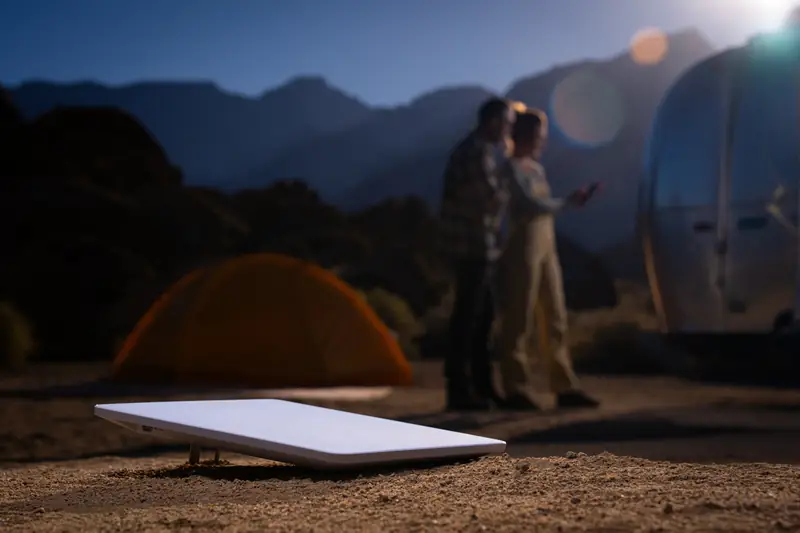
Starlink for RV and van life: your rig, online at every stop
Checkout happens on Starlink.com. Starlink sets the U.S. referral credit, now $100 for new customers. This is a referral link.
Campground Wi-Fi tends to give out right when everyone gets back from the trail, and the best boondocking spots are often the ones with zero bars. With Starlink on the rig, the connection travels with you instead of depending on whoever runs the park.
How RVers and van-lifers use it
Boondocking without going dark
Public land, forest pullouts, desert washes: if the dish can see the sky, you can check weather, download maps and call home.
Working from the road
Video calls and uploads from a site with no cell signal. Nearly half of mobile users in a 2026 survey rely on Starlink for work or income.
Skipping crowded park Wi-Fi
Your own connection at a full campground, instead of one shared access point for forty rigs.
Changing plans mid-route
Look up the next dump station, fuel stop or road closure when the route shifts.
Rest-day streaming
A movie night after a long drive, without burning through a phone hotspot cap.
Staying reachable
Family and clients can reach you even when the route runs through dead zones.
Power: plan for it like any other appliance
The Mini is the easy one to power: Starlink's spec sheet puts it at 25 to 40 W average, about 2 to 3.5 amps at 12 V. A few evening hours barely dent a lithium house battery. Running it all day is another story.
Standard kits use roughly 75 to 100 W through an outlet, so off grid that means an inverter or generator. The full amp-hour, battery and solar math is on Starlink Mini power draw in an RV.
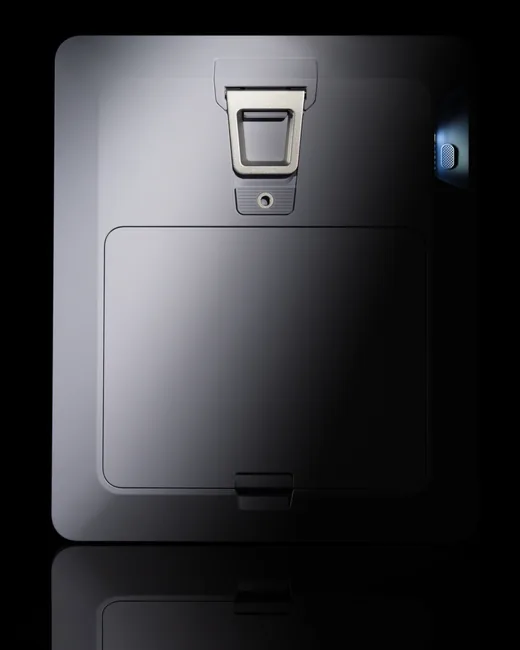
Which Starlink kit fits the rig: Mini, Mini 2 or Standard
Most RVers end up choosing between three kits. They all run the same Roam plans; the difference is power, mounting and how often you move.
| Starlink Mini | Starlink Mini 2 | Standard | |
|---|---|---|---|
| Best fit | Vans, small trailers, moving camp often | Setting up away from the rig, short sessions without wiring | Big rigs that stay put for days, roof or ladder mounts |
| Power | 12–48 V DC, 25–40 W average | USB-C 60 W, plus a 71 Wh battery rated up to 4.5 hours | Mains power through its supply; plan for an inverter or generator off grid |
| Wi-Fi | Built in, Wi-Fi 5, up to 1,200 sq ft | Built in, Wi-Fi 6, up to 1,800 sq ft | Separate Starlink router |
| In-motion list | Yes | Not listed yet | Standard 4 and Standard 4 X are listed |
| Buying | On Starlink's order page | Invitation-only preorder in the U.S. | On Starlink's order page; a Roam activation charge can apply in some markets |
Full Mini 2 specs are on the Starlink Mini 2 page. The Mini vs Standard guide goes deeper on the two kits you can order today.
Wiring power into an RV or van
The cleanest RV setups run the dish straight from the house battery and skip the inverter, because converting 12 V to mains and back wastes power.
- Original Mini on DC: Starlink's spec sheet gives an input rating of 12–48 V at 60 W, so a fused 12 V circuit from the house battery works. Starlink only guarantees performance with its own supply and cable, so use a proper DC cable and watch for voltage drop on long runs.
- Original Mini on USB-C: Starlink says USB-C needs at least 100 W at 20 V / 5 A, with its USB-C to barrel-jack accessory cable. Many vehicle and RV USB-C outlets deliver less than that.
- Mini 2: Starlink lists 60 W USB-C charging, so a 60 W PD outlet or power station can run it and charge the battery together.
- Standard kit: it runs through its mains power supply, so off grid that means an inverter sized for it, a generator or shore power.
- Solar and battery size: the Mini power guide has the amp-hour, battery and solar math for a Mini.
Mounting it on the rig
- Parked only: the kickstand on the ground or a picnic table is the simplest setup. Move it a few feet if the app flags obstructions.
- Permanent mount: Starlink sells mounts for vehicle racks and poles. A fixed mount keeps the dish ready and off the ground.
- Driving with it on: in-motion use is supported on Roam plans in select areas. Use a mount made for travel, and never drive with a kit sitting loose on the roof or hood.
- Cable entry: route the cable through an existing roof penetration or a sealed entry plate to keep water out.
Campground, boondocking or rolling
The kit is the same, but the setup that works depends on the stop.
| Where you are | Typical setup | Common snag | What helps |
|---|---|---|---|
| Full-hookup campground | Kickstand on the picnic table, shore power | Neighbors' rigs and big shade trees | Pick an open site, or set the dish a few feet from the rig |
| Public land, boondocking | Kickstand or pole mount, battery power | Battery drain on long days | The Mini's lower draw, plus solar |
| Forest campsites | Pole mount in the clearest gap | Canopy blocking the view | Run the app's obstruction check before leveling the rig |
| Driving between stops | A mount made for travel, on a Roam plan | In-motion use only in select areas | Set it up before you roll; never leave a kit loose |
Setting up Starlink for RV camping, step by step
The routine at a new site takes a few minutes once you have done it twice. Doing it in this order saves re-leveling the rig because the dish cannot see the sky.
- Before you back in, open the Starlink app and run the obstruction check from where the dish will sit. It shows which part of the sky is blocked, so you can pick the site or the spot before you level the rig.
- Set the kickstand on level ground or a picnic table a few feet from the rig, or raise it on a pole mount if the site is wooded. The Mini is oriented by hand with help from the app, so follow its pointing guide.
- Power it up: the Mini from 12 V DC or its supply, Mini 2 from its battery or USB-C, a Standard kit from shore power or an inverter.
- Join the Starlink Wi-Fi network and let it finish any update. A first connection at a new site can take a few minutes.
- Run a speed test and a short video call before you rely on it for work. If it drops every few minutes, the app's obstruction map usually shows why.
- When you pack up, coil the cable loosely and stow the dish face-up and padded. A cracked face or a kinked cable ends the trip's internet.
Getting Wi-Fi to the back of the rig
The router is part of the kit, so Wi-Fi starts where the dish or router sits. Starlink rates the Mini's built-in Wi-Fi 5 at up to 1,200 sq ft and Mini 2's Wi-Fi 6 at up to 1,800 sq ft, which is more floor space than any RV has. Walls are the problem, not distance.
Aluminum-skinned trailers, metal roofs and slide-outs can weaken a signal from a dish sitting outside. If the bedroom end is slow, bring the Mini closer to a window, run the Starlink cable into the rig with a router inside, or add a Starlink mesh unit; Starlink says the Mini works with its mesh systems. The original Mini also has a latching Ethernet port for a wired laptop, with Starlink's Mini Ethernet cable.
Weather on the road: heat, cold, rain and snow
Starlink's Mini spec sheet lists an operating range of -30 °C to 50 °C (-22 °F to 122 °F), an IP67 rating with the cable fitted, operation in wind of 60 mph and up, and snow melt up to 1 inch an hour. Mini 2 is also rated IP67. Heavy rain or wet snow can still slow a connection for a while.
In practice, the risks on an RV trip are wind and theft more than rain. Weigh down or tether a kickstand at a windy site, bring the dish in during a storm if it is not on a fixed mount, and do not leave a loose kit out at an unattended campsite.
Working from the road
Plenty of RVers keep a job going from the rig. A few habits make it smoother.
- Check the sky before you park for the week. Five minutes with the app's obstruction check saves days of dropped calls.
- Plan around data, not just speed. On Roam 100GB or 300GB, video calls and cloud backups add up; Unlimited removes that worry.
- Keep a backup. A phone hotspot covers the odd outage during an important meeting.
- Power the desk too. Laptop, monitor and router all draw from the same battery as the dish.
Test it in the driveway before you leave
Starlink's 30-day trial gives you time to try the kit, your mount and your power setup at home.
Click to get your $100 credit (opens Starlink's order page in a new tab)
Referral note: this is a referral link. New Roam or Residential customers who order through it can get a reward from Starlink after two months of service, $100 in the U.S. at the moment, as bill credit or cash. Starlink decides the amount and the rules.
Starlink for RV travel: which Roam plan fits
Every RV setup runs on a Starlink Roam plan. On November 27, 2026, Starlink's U.S. pages listed Roam 100GB at $55 a month, Roam 300GB at $80 and Roam Unlimited at $175. The two smaller plans drop to unlimited low-speed data after the allotment; Unlimited has no high-speed cap.
- Weekenders: Roam 100GB, which Starlink describes as about a week of typical use. Switch to Standby Mode between trips.
- Snowbirds and part-time travelers: Roam 300GB for the travel months, Standby for the rest.
- Full-timers who work online: Roam Unlimited, or Roam 300GB if your calls are light. The data table below shows how far video calls go.
- Heading to Mexico or abroad: only Roam Unlimited works outside the U.S. and Canada, for up to 30 days at a time after Travel Registration. See Roam in Mexico.
The full side-by-side, including what Unlimited means under Starlink's Fair Use Policy and when it is worth the extra $95 over 300GB, is on the Starlink Roam plans comparison. A year-by-year budget is on the travel overview. If you also keep a dish at a house, Starlink Residential plans are compared against Roam on atshore.com, including why a home plan cannot travel with the rig.
How far Roam data goes on work calls
If you work from the rig on Roam 100GB or 300GB, video calls are the biggest regular data user. Here's the math from Zoom's own figures.
| Call quality | Zoom's upload + download | Data in one hour | Hours in 100GB |
|---|---|---|---|
| High quality (360p) | 1.0 + 0.6 Mbps | about 0.7 GB | about 140 |
| 720p HD | 2.6 + 1.8 Mbps | about 2 GB | about 50 |
| 1080p HD | 3.8 + 3.0 Mbps | about 3 GB | about 33 |
From Zoom's published bandwidth for group meetings, read November 22, 2026. Those are peak estimates, so real calls often use less. Data = Mbps x 3,600 seconds / 8, rounded.
Your first week with the kit
- Set it up in the driveway first and let it update before the trip.
- Learn the app's obstruction check at home, where you can move the dish freely.
- Test your power plan: run the kit off the house battery for an evening and note the drop.
- Try your mount on a short local drive before a long one.
- Turn on Standby or pick a plan for the next month before you leave cell coverage.
Taking the RV across a border
For a U.S. account, Canada sits in the same grouped region, so Roam 100GB and 300GB keep working on a trip north. The U.S.-Canada road trip guide covers the details.
Mexico is different. You need Roam Unlimited and Travel Registration before you cross, you get up to 30 days at a time, and Starlink says in-motion use on land is prohibited there. Plan to park before you set the dish up.
Who Starlink in an RV isn't for
- Campers who stay where cell signal is strong: a hotspot may cover light browsing for less.
- Rigs that always park under dense trees: the dish needs open sky.
- Tight budgets with small batteries: budget for power, not just the plan.
Bring the connection along on the next trip
Choose a Roam plan for the season, and pause it with Standby Mode when the rig is parked.
Click to get your $100 credit (opens Starlink's order page in a new tab)
Referral note: this is a referral link. New Roam or Residential customers who order through it can get a reward from Starlink after two months of service, $100 in the U.S. at the moment, as bill credit or cash. Starlink decides the amount and the rules.
Questions
RV and van questions
Does Starlink work at RV parks with lots of trees?
Trees are the most common problem. Starlink needs a wide view of the sky, so pick a site with an opening overhead, raise the dish on a pole, or set it away from the rig. The app shows obstructions before you commit.
Can I use one kit at home and in the RV?
Roam goes wherever the rig goes. If you also want a fixed home plan, Residential Max includes an optional extra Mini kit with discounted Roam, per Starlink.
Will it work while I drive?
Starlink supports in-motion use on Roam plans in select areas. Use a mount made for travel and set it up before you roll.
How do I power Starlink in an RV or van?
The original Starlink Mini runs on 12–48 V DC (25–40 W average, per Starlink's spec sheet), so a fused circuit from the house battery works. Mini 2 takes 60 W USB-C and has its own battery. Standard kits usually need shore power, an inverter or a generator.
Which Roam plan suits full-timers?
Roam Unlimited, from $175 a month, has no high-speed data limit and covers travel in 160+ countries and territories. Part-timers often start on Roam 100GB or 300GB. Compare them on the travel overview.
Is Starlink worth it for an RV?
If you camp where cell signal is weak or work from the road, usually yes. If you mostly stay at campgrounds with strong cell coverage and only browse lightly, a phone hotspot may be enough for less money.
Can I use a Residential plan in my RV?
Not for travel. Starlink does not permit in-motion use on any Residential plan, which is the home plan. Roam is the plan built for RVs; Residential Max customers can add an optional Mini kit with discounted Roam, per Starlink.
What happens when I run out of Roam data on the road?
On Roam 100GB and 300GB, service switches to unlimited low-speed data for the rest of the month. Starlink says that supports email, calls and texts, but streaming and video calls will be limited. You can change plans from your account.
Should I wait for the Starlink Mini 2 for my RV?
Only if you want a battery for setups away from the rig. The original Mini runs well on 12 V house power and is on Starlink's in-motion list; Mini 2 is invitation-only for now. See the Mini 2 page.
Ordering Roam?
A $100 credit for first-time Starlink travelers
Never had Starlink before? Start the Roam order with the button below and Starlink can add a $100 credit to your account once you've had service for two months. The kit and plan cost exactly what Starlink charges anyway.
Click to get your $100 credit (opens Starlink's order page in a new tab)
That link includes my referral code, so I may get a referral benefit as well. This is a referral link. Starlink can change the program whenever it likes.